BitSilo by MollieSoft1.3.4.0
Publisher Description
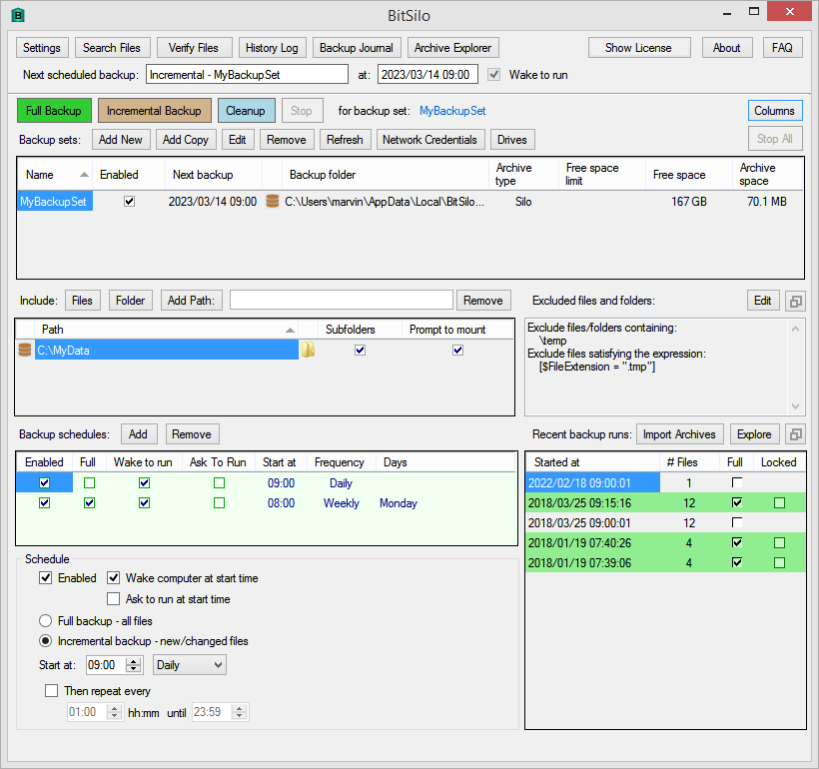
** BitSilo creates timestamped backups for files and directories you specify.
** Create multiple backup sets, each containing a different set of files or directories to be backed up on a daily/weekly/monthly schedule.
** Create a full backup to save all the specified files; create an incremental backup to save only those files that have changed since the last backup.
** Exclude files from the backup using any part of the file folder or name, or using a filter expression.
** Restore files from any backup using a flexible query language to find files.
** Verify (compare) files in any backup against the original source files, either automatically after each run, or at any later time.
** Backup files can be stored in a folder, in a 'Silo' format for efficiency, or in a zip file (zip size limited to about 1.8 GB).
** Automatic cleanup of old backups with flexible rules governing which recent backups to keep. Lock a backup run to prevent cleanup from removing it.
** Backups and source files can reside on any addressable network share if desired.
** Recognize removable drives by volume serial number, even if the drive letter changes.
About BitSilo by MollieSoft
This Backup & Restore program is available in English. It was last updated on 29 September, 2026. BitSilo by MollieSoft is compatible with the following operating systems: Windows.
The company that develops BitSilo by MollieSoft is MollieSoft. The latest version released by its developer is 1.3.4.0.
The download we have available for BitSilo by MollieSoft has a file size of 1.0 MB. Just click the green Download button above to start the downloading process. The program is listed on our website since 2023-03-16 and was downloaded 3 times. We have already checked if the download link is safe, however for your own protection we recommend that you scan the downloaded software with your antivirus. Your antivirus may detect the BitSilo by MollieSoft as malware if the download link is broken.
How to install BitSilo by MollieSoft on your Windows device:
- Click on the Download button on our website. This will start the download from the website of the developer.
- Once the BitSilo by MollieSoft is downloaded click on it to start the setup process (assuming you are on a desktop computer).
- When the installation is finished you should be able to see and run the program.
Program Details
System requirements
Download information
Pricing
Version History
version 1.3.4.0
posted on 2023-03-16
1.3.4.0 - Ask to run for schedules; one-time schedules. Added ask to stop checkbox in Settings dialog. Expandable panels on main window. Asynchronous wait for Stop or Stop All buttons.
version 1.3.3.0
posted on 2022-07-27
1.3.3.0 -- Added word wrap checkbox and find bar to history log window. Various minor bug fixes.
version 1.3.2.0
posted on 2022-02-21
1.3.2.0 - New Archive Explorer View shows your archives in an Explorer-style layout. Import archives not currently managed by BitSilo, e.g. produced by another computer. Restore Files View has been renamed to Search Files View, since restore can actually be performed from many different views.
version 1.3.1.0
posted on 2021-12-29
1.3.1.0 - Improvements to memory management. Allow simultaneous backup runs. Search improvements. Fixed "tiny font" problem on some displays. Uses .NET 4.6.1. Recognize removable drives by volume serial number, even if drive letter changes. Exclude files from a backup using a filter expression.
version 1.2.8.0
posted on 2019-08-25
1.2.8.0 - Ensure incremental backup runs are always associated with the most recent full backup run.
version 1.2.7.0
posted on 2018-12-31
1.2.7.0 - No schedule can run while a dialog box is open.
